---
title: How to Contact Spokn Support?
description: Need help with Spokn? Chat live with a real person via the purple chat bubble in the app or Help Center, or email hello@getspokn.com.
---
[Skip to content](https://go.getspokn.com/how-to-contact-spokn-support#main-content)
[](https://go.getspokn.com/?hsLang=en)
Open main navigation
Close main navigation
- [Sign in](https://app.getspokn.com/login)
[Sign in](https://app.getspokn.com/login)
Hi, what can we help you with?
- There are no suggestions because the search field is empty.
1. [Spokn Help Center](https://go.getspokn.com/?hsLang=en)
2. [FAQs](https://go.getspokn.com/faqs?hsLang=en)
# How to Contact Spokn Support?
### Contact Us via Live Chat
The fastest way to get support is through our live chat. When you reach out, you'll connect directly with a real member of our team — not a bot.
---
### How to access live chat:
#### From the Spokn platform:
1. Log in to your Spokn account.
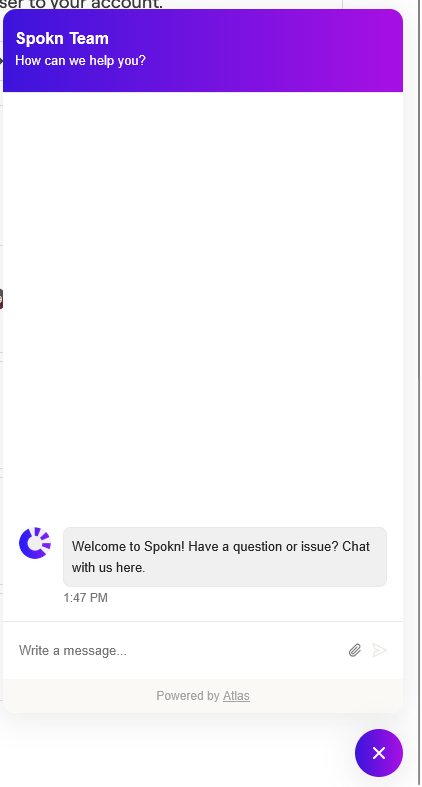
2. Look for the **purple chat bubble** in the bottom-right corner of your screen.
3. Click the bubble to open the chat window.

4. Type your message and send — a member of our team will respond as soon as possible.
#### 
### From the Help Center (Atlas):
1. Visit the Help Center.
2. Click the **purple chat bubble** in the bottom-right corner.
3. Start a conversation with our team.
Live chat is monitored regularly, and we aim to respond quickly during business hours.
---
### Contact Us via Email
You can also reach us by email at:
[**hello@getspokn.com**](mailto:hello@getspokn.com)
When emailing support, please include:
- A brief description of your question or issue
- The workspace name (if applicable)
- Screenshots or screen recordings (if helpful)
Providing this information upfront helps us resolve your request faster.
---
### What to Expect
- A response from a real member of the Spokn team
- Clear next steps or troubleshooting guidance
- Follow-up communication if additional details are needed
If your request is urgent, we recommend using live chat for the quickest response.
---
If you're not sure whether something is a bug, a feature question, or a best-practice question — reach out. We're happy to help.
- [Admin Setup](https://go.getspokn.com/admin-setup?hsLang=en)
- [Spokn SSO and IT Configuration](https://go.getspokn.com/spokn-sso-and-it-configuration?hsLang=en)
- [Setting Up a Video Story](https://go.getspokn.com/setting-up-a-video-story?hsLang=en)
- [Recording](https://go.getspokn.com/recording?hsLang=en)
- [Recording Best Practices](https://go.getspokn.com/recording-best-practices?hsLang=en)
- [Editing Clips](https://go.getspokn.com/editing-clips?hsLang=en)
- [AI-Powered Enhancements](https://go.getspokn.com/ai-powered-enhancements?hsLang=en)
- [Branding & Customization](https://go.getspokn.com/branding-customization?hsLang=en)
- [Sharing Your Videos](https://go.getspokn.com/sharing-your-videos?hsLang=en)
- [FAQs](https://go.getspokn.com/faqs?hsLang=en)
[](https://www.spokn.com/)
© 2025 Spokn. All Rights Reserved.