---
title: How to Manage User Roles
description: Assign, change, or remove Spokn user roles from Enterprise Tools > Users. Role changes apply instantly, and removed users' content is kept.
---
[Skip to content](https://go.getspokn.com/how-to-manage-user-roles#main-content)
[](https://go.getspokn.com/?hsLang=en)
Open main navigation
Close main navigation
- [Sign in](https://app.getspokn.com/login)
[Sign in](https://app.getspokn.com/login)
Hi, what can we help you with?
- There are no suggestions because the search field is empty.
1. [Spokn Help Center](https://go.getspokn.com/?hsLang=en)
2. [Admin Setup](https://go.getspokn.com/admin-setup?hsLang=en)
# How to Manage User Roles
## Managing user roles ensures the right people have the right level of access within your Spokn workspace. This guide walks you through how to assign and update roles for users in your account.
### Overview
Spokn uses role-based permissions to control what users can see and do within your workspace. Assigning the correct role helps:
- Maintain security and compliance
- Streamline workflows
- Prevent accidental changes to critical content
- Ensure teams have appropriate publishing access
---
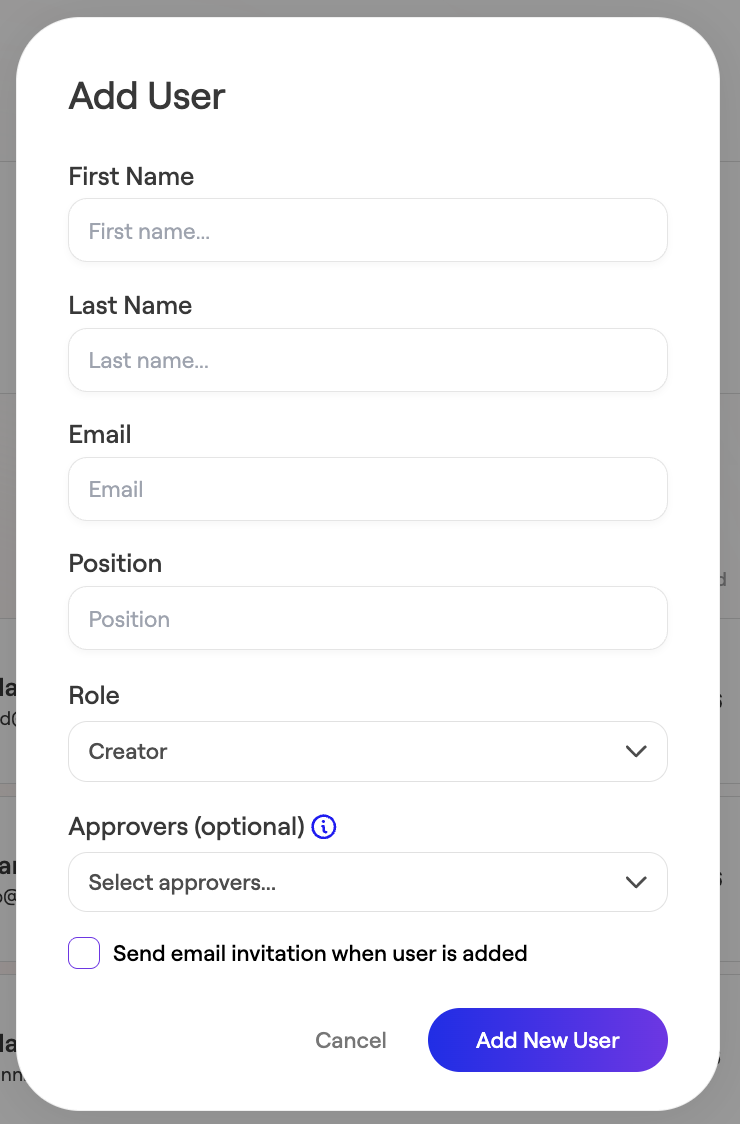
### How to Assign a Role to a New User
1\. Navigate to **Enterprise Tools**
2\. Select **Users**
3\. Click **Add Users**

4\. Enter the user’s details
5\. Select the appropriate **Role**
6\. Click **Add New User**
---
### How to Change an Existing User’s Role
1\. Go to **Enterprise Tools**
2\. Click **Users**

3\. Find the user in the list
4\. Click the **Role dropdown** next to their name
5\. Select the new role
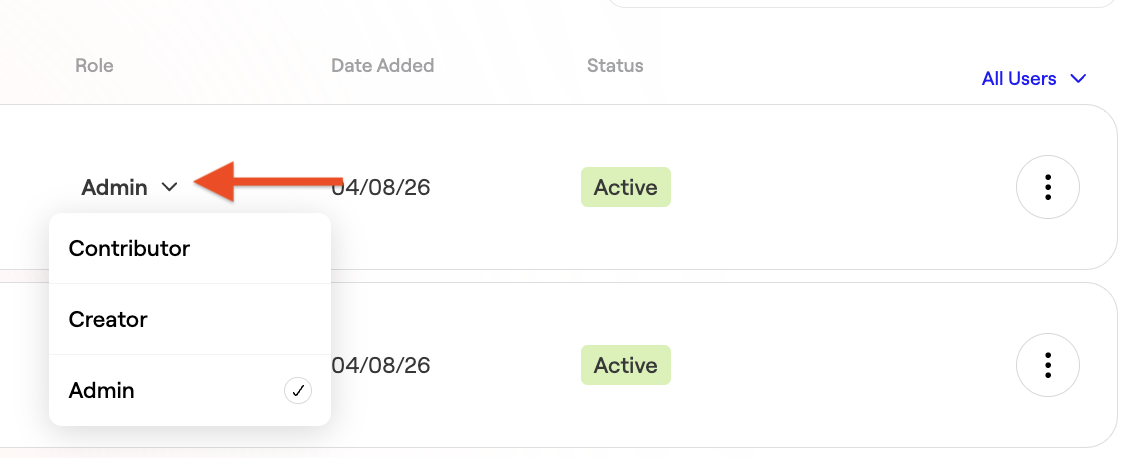
Changes take effect immediately.
---
### Removing a User
1\. Navigate to **→ Users**
2\. Locate the user
3\. Click the **three-dot menu**
4\. Select **Remove User**
5\. Confirm removal
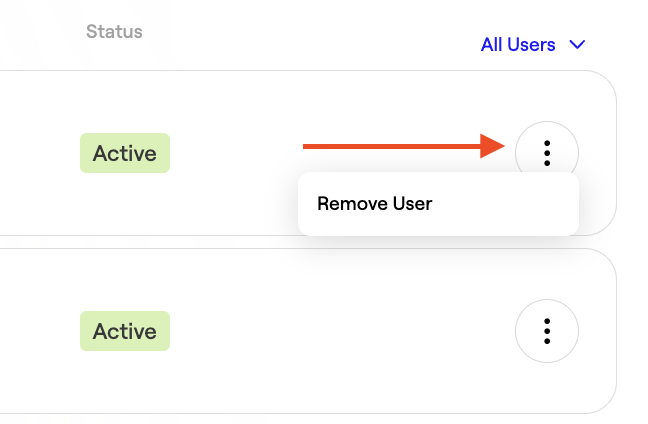
\> Note: Removing a user does not delete content they previously created.
---
### Best Practices for Role Management
- Review user roles quarterly
- Apply the principle of least privilege (only grant necessary access)
- Remove access immediately when team members leave
---
### Frequently Asked Questions
**Can I assign multiple roles to a user?**
No. Each user can only have one role at a time.
**Can roles be customized?**
Role customization depends on your plan. Contact your Spokn administrator or support team for advanced permission configurations.
**What happens if I downgrade someone’s role?**
They will immediately lose access to any permissions tied to their previous role.
- [Admin Setup](https://go.getspokn.com/admin-setup?hsLang=en)
- [Spokn SSO and IT Configuration](https://go.getspokn.com/spokn-sso-and-it-configuration?hsLang=en)
- [Setting Up a Video Story](https://go.getspokn.com/setting-up-a-video-story?hsLang=en)
- [Recording](https://go.getspokn.com/recording?hsLang=en)
- [Recording Best Practices](https://go.getspokn.com/recording-best-practices?hsLang=en)
- [Editing Clips](https://go.getspokn.com/editing-clips?hsLang=en)
- [AI-Powered Enhancements](https://go.getspokn.com/ai-powered-enhancements?hsLang=en)
- [Branding & Customization](https://go.getspokn.com/branding-customization?hsLang=en)
- [Sharing Your Videos](https://go.getspokn.com/sharing-your-videos?hsLang=en)
- [FAQs](https://go.getspokn.com/faqs?hsLang=en)
[](https://www.spokn.com/)
© 2025 Spokn. All Rights Reserved.