---
title: Network and Security Requirements (IT Setup)
description: Allowlist Spokn domains, email senders, and AWS S3 endpoints so login emails arrive and videos stream and upload. Fix black-box videos and failed uploads.
---
[Skip to content](https://go.getspokn.com/network-and-security-requirements-it-setup#main-content)
[](https://go.getspokn.com/?hsLang=en)
Open main navigation
Close main navigation
- [Sign in](https://app.getspokn.com/login)
[Sign in](https://app.getspokn.com/login)
Hi, what can we help you with?
- There are no suggestions because the search field is empty.
1. [Spokn Help Center](https://go.getspokn.com/?hsLang=en)
2. [Spokn SSO and IT Configuration](https://go.getspokn.com/spokn-sso-and-it-configuration?hsLang=en)
# Network and Security Requirements (IT Setup)
## To ensure Spokn works reliably across your organization, certain domains and services must be allowlisted within your network and email security settings. These steps must be completed for all employees, including executives or users with additional security restrictions. If these configurations are not in place, users may experience issues with email delivery, video streaming, or video uploads.
### Overview
Your IT team may need to configure allowlisting in three areas:
1. Email and application domains
2. Video streaming (inbound traffic)
3. Video recording and uploads (outbound traffic)
Each section below explains what to allow and why it is required.
---
### 1\. Allowlisting Spokn Domains
Allowlisting Spokn domains ensures that:
- Activation emails are delivered
- Invitations to record video clips are received
- Notifications are sent successfully
- The application loads and functions properly
---
### Email Allowlisting
Please allowlist the following domains and sender details:
- [www.getspokn.com](http://www.getspokn.com/)
- Activation emails sent from: [hello@getspokn.com](mailto:hello@getspokn.com)
- Activation emails mailed by: amazonses.com
If these domains are blocked, users may not receive login codes, invitations, or notifications.
---
### Application Traffic Allowlisting
Please allow outbound traffic from your network to the following:
- api.spokn.app
- api.podio.app
- 35.244.156.174
- 52.41.15.243
No inbound allowlisting is required for general app access.
2\. Allowing Video Streaming (Inbound Traffic)
Spokn uses Amazon Web Services (AWS) Simple Storage Service (S3) for video storage and streaming.
Some organizations block streaming services through firewall or network policies. When this happens, videos may appear as black boxes or fail to load entirely.
---
### Required Configuration
If video playback is blocked, adjust your network settings to allow inbound traffic from:
- [https://audios.podio.xyz](https://audios.podio.xyz/)
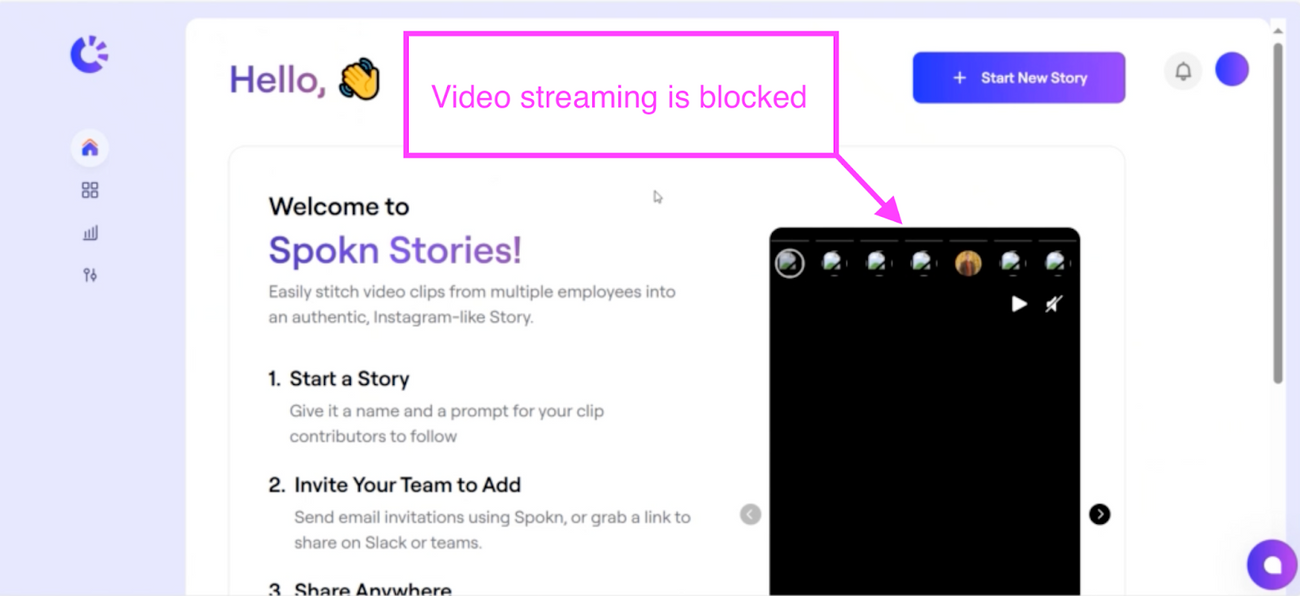
Once allowlisted, videos should stream normally within Spokn.
3\. Allowing Video Recording and Uploads (Outbound Traffic)
Spokn also relies on AWS S3 for video uploads.
If outbound traffic is restricted, users may be able to record videos, but the files will not upload or save to the story.
---
### Required Configuration
Allow outbound traffic to the following:
- [https://s3.us-east-2.amazonaws.com/audio.podio.xyz](https://s3.us-east-2.amazonaws.com/audio.podio.xyz)
- [https://s3.us-east-2.amazonaws.com/image.podio.xyz](https://s3.us-east-2.amazonaws.com/image.podio.xyz)
Without this configuration, recorded videos may fail to upload.
---
### Common Symptoms of Network Restrictions
If your network settings require adjustment, you may see:
- Activation or login emails not being delivered
- Videos displaying as black boxes
- Videos recording successfully but failing to upload
- Stories saving without recorded clips
These issues are typically resolved once the required domains are allowlisted.
---
### Next Steps
Share this article with your IT or security team to ensure proper configuration.
If your organization continues to experience issues after allowlisting the domains above, contact the Spokn team for assistance.
Proper network configuration ensures reliable login, recording, streaming, and story creation across your organization.
- [Admin Setup](https://go.getspokn.com/admin-setup?hsLang=en)
- [Spokn SSO and IT Configuration](https://go.getspokn.com/spokn-sso-and-it-configuration?hsLang=en)
- [Setting Up a Video Story](https://go.getspokn.com/setting-up-a-video-story?hsLang=en)
- [Recording](https://go.getspokn.com/recording?hsLang=en)
- [Recording Best Practices](https://go.getspokn.com/recording-best-practices?hsLang=en)
- [Editing Clips](https://go.getspokn.com/editing-clips?hsLang=en)
- [AI-Powered Enhancements](https://go.getspokn.com/ai-powered-enhancements?hsLang=en)
- [Branding & Customization](https://go.getspokn.com/branding-customization?hsLang=en)
- [Sharing Your Videos](https://go.getspokn.com/sharing-your-videos?hsLang=en)
- [FAQs](https://go.getspokn.com/faqs?hsLang=en)
[](https://www.spokn.com/)
© 2025 Spokn. All Rights Reserved.